Simulation-driven design.
Lattice design and simulation for 3D printing, in your browser
IMPLICIT keeps the outside of your part and fills the inside with a lattice. Simulate the loads first if you like, and the lattice puts material where the part works. Then download a file for your slicer.
Open IMPLICIT Free, in the browser. No installation, no account to start.
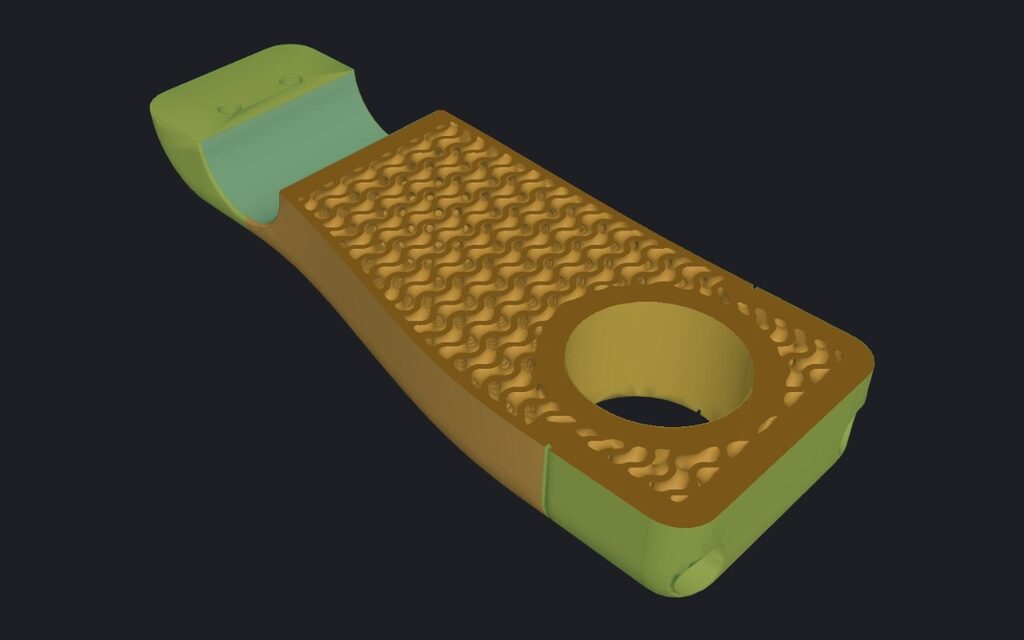
From a solid part to a printable lattice
Four steps, each one a tab of the app:
- Prepare: open a STEP, STL or 3MF (also inside a .zip). STEP files keep their faces; on a mesh they are detected. Pick the faces that are supported, loaded, left open or kept solid.
- Simulate (optional): a linear static analysis of the solid part shows where the stress is. See FEA for 3D printing.
- Lattice: choose a TPMS, beam or stochastic lattice, the cell size and the wall, and see a preview in the viewer. The wall can follow a field: graded lattices.
- Export: an STL for any slicer, with checks for thin walls and overhangs. Pro adds 3MF and STEP.
It runs on your computer
IMPLICIT is a web page: there is nothing to install. Geometry, simulation and export are computed in your browser with WebAssembly, so your part is never uploaded to a server. You only need an account to buy Pro or to ask for Education.
It is built for parts that fit in a browser’s memory. Before generating, the app estimates time and memory and warns you if a job will not fit.
Free, Pro and Education
The Free plan has every design tool on screen, the lattices, linear FEA and topology optimisation, with no account and no card; it exports 3 STL files a day, with a voxel of 0.5 mm or larger. Pro costs €12 a month or €96 a year, taxes included: unlimited exports at any resolution, 3MF and STEP, Verify, the nonlinear, thermal and aerodynamic simulations, and exporting designs that use the Pro tools. Education is Pro for free for non-commercial learning, teaching and research. Details on the pricing page.
Frequently asked questions
What is IMPLICIT?
A web app that makes 3D-printed parts lighter. It keeps the part’s outer shape and replaces its solid inside with a lattice, a network of cells that weighs less and uses less material, and gives you a file ready for the slicer.
Do I need to install anything?
No. IMPLICIT runs in a desktop browser. There is nothing to install and no account needed to start.
Do my files leave my computer?
No. The file is read, meshed, simulated, filled with the lattice and exported in your browser. Nothing of the part is uploaded.
Which files can I open?
STEP, STL and 3MF, also inside a .zip. 3D scans in PLY or OBJ can be opened, repaired and wrapped too; exporting a design built on a scan is Pro.
Are the simulation results exact?
No simulation is. IMPLICIT solves on voxels, which is fast and robust but approximate, especially at small holes and sharp corners. Use it to compare designs and find where the part works, and check critical parts by testing them. See how accurate the FEA is.
Open IMPLICIT Free, in the browser. No installation, no account to start.
What you can do with IMPLICIT
- Lattice generatorGyroid and other TPMS, beam cells, Voronoi and spinodal.
- Topology optimisationThe stiffest layout for the material you allow.
- FEA for 3D printingStress, displacement and safety factor in the browser.
- Custom insolesFrom foot size, pressure map or scan to a lattice insole.
- Graded latticesWall or cell size by stress, heat, image or pressure.
- Embossing and texturesText, logos and patterns, raised or engraved.
- EducationEvery Pro feature, free, for learning and research.