Simulation-driven design.
Topology optimisation for 3D-printed parts
Tell IMPLICIT where the part is held, where it is loaded and how much material it may keep. Topology optimisation finds the stiffest layout for that material budget and gives you an organic shape to print.
Open IMPLICIT Free, in the browser. No installation, no account to start.
What it does, and what it does not
IMPLICIT uses SIMP (solid isotropic material with penalisation), a well-established method. It minimises compliance: for the supports, loads and material fraction you set, it looks for the layout that deflects least. That is stiffness, not strength. A stiff layout often has lower stresses too, but the method does not check them, so run a stress analysis on the result before you trust it.
In the example L bracket, keeping 30 % of the material (1.5 mm analysis voxel, 28 iterations) gave a shape with 73 % of the solid part’s stiffness. Each case is different; the app tells you the figure for yours.
How you set it up
- Supports and loads on faces you pick in Prepare, with several load cases if you need them.
- The share of material to keep, and zones that must stay solid, such as bolt holes and bearing seats.
- An analysis voxel with a time and memory forecast before you start, and a «Recommended» setting.
- A filter radius in millimetres that sets the thinnest member, and a «standard» or «organic» finish for the exported surface.
How long it takes
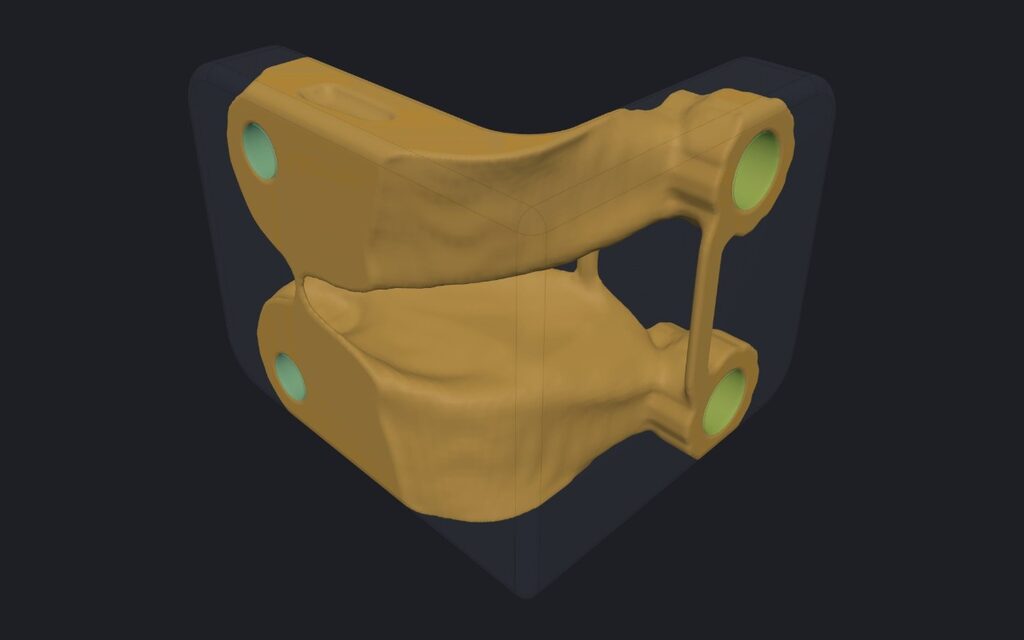
Everything is solved in your browser. On the example bellcrank (143 mm, 40 % of the material), a 2 mm analysis voxel meant 26,481 cells and 31 iterations, and took 42 to 52 s in Chromium on our test machine; a 1 mm voxel took several minutes. It may take more or less time on your computer.
You can run topology optimisation and see the result on the Free plan; exporting the optimised shape is Pro. It pairs with FEA and with lattices: you can also optimise lattice density for a target mass.
Frequently asked questions
Is the optimised part stronger?
It is the stiffest layout the method found for the material you allowed, which is not the same as strongest. Check stresses with a static analysis, and with Verify (Pro) once you have the final design.
Can I keep some areas untouched?
Yes. Faces and zones you mark as solid stay solid, and the loaded and supported faces are kept.
Why does the result change with the analysis voxel?
A finer voxel lets thinner members appear and takes longer. The filter radius, in millimetres, keeps the thinnest member about the same when you change the voxel.
What do I get at the end?
A closed mesh of the optimised shape, with a smooth «organic» finish if you choose it. With Pro you export it as STL, 3MF or STEP.
Open IMPLICIT Free, in the browser. No installation, no account to start.
What you can do with IMPLICIT
- Lattice generatorGyroid and other TPMS, beam cells, Voronoi and spinodal.
- FEA for 3D printingStress, displacement and safety factor in the browser.
- Custom insolesFrom foot size, pressure map or scan to a lattice insole.
- Graded latticesWall or cell size by stress, heat, image or pressure.
- Embossing and texturesText, logos and patterns, raised or engraved.
- EducationEvery Pro feature, free, for learning and research.