Simulation-driven design.
FEA in the browser for 3D-printed parts
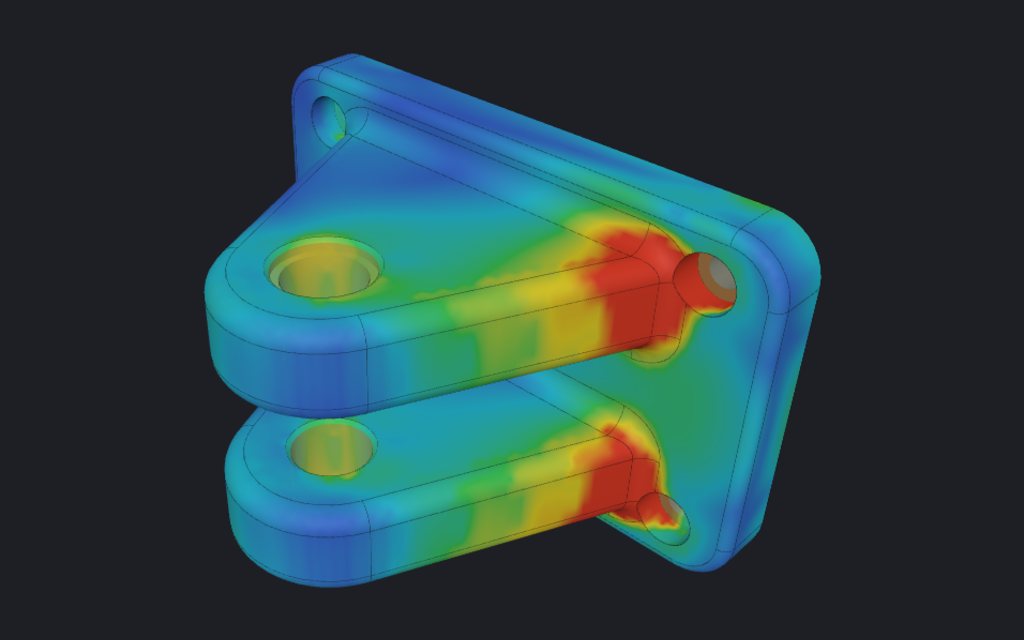
Before you lighten a part, see where it works. IMPLICIT runs a static stress analysis of your part in the browser and can use the result to put more lattice where the stress is high.
Open IMPLICIT Free, in the browser. No installation, no account to start.
What is included
With Pro you also get Verify, which repeats your analysis on the generated lattice, and nonlinear (large deformation), thermal and aerodynamic simulations.
- Linear static analysis: von Mises stress, displacement and safety factor, with several load cases.
- Supports and forces on the faces you pick, and a library of printing materials (polymers and metals) with their properties.
- The result as a map on the part, with the maximum values and where they are.
- Stress or temperature can drive the lattice wall: thicker where the part works hardest. See graded lattices.
How accurate it is
The solver uses voxels (8-node hexahedra) instead of a mesh that follows the surface. It is fast and does not fail on messy geometry, but it is approximate, and you should treat its numbers as estimates.
We measure it against published benchmarks. Bending stress in a 100 × 10 × 10 mm beam comes within 2.4 % of the textbook value with a 0.5 mm voxel. Stress concentrations are harder: at the edge of the hole in the NAFEMS LE1 benchmark it reads 16.6 % low at 0.5 mm and 13.5 % low at 0.25 mm, because a curved edge becomes a staircase of voxels. Use a finer voxel near small holes, and a safety factor that reflects this.
Why in the browser
Your part does not leave your computer, there is nothing to install, and the analysis sits next to the lattice and the export, so a design change is one click away from a new result. Linear FEA is included in the Free plan.
Frequently asked questions
Is this a replacement for a full FEA package?
No. It is a quick linear analysis to guide a printed design. It does not model print anisotropy, layer adhesion or fatigue, and it is approximate near small features. For a certified part, use a validated analysis and physical tests.
Does the analysis include the lattice?
The first analysis runs on the solid part, to decide where the material goes. Verify (Pro) repeats it on the generated lattice, so you can compare the safety factor before and after.
What is the safety factor here?
The material’s yield strength divided by the von Mises stress, at every point; the app shows the minimum and where it is. It shares the solver’s approximation, so leave margin.
Is my part uploaded to run the analysis?
No. The solver runs in your browser.
Open IMPLICIT Free, in the browser. No installation, no account to start.
What you can do with IMPLICIT
- Lattice generatorGyroid and other TPMS, beam cells, Voronoi and spinodal.
- Topology optimisationThe stiffest layout for the material you allow.
- Custom insolesFrom foot size, pressure map or scan to a lattice insole.
- Graded latticesWall or cell size by stress, heat, image or pressure.
- Embossing and texturesText, logos and patterns, raised or engraved.
- EducationEvery Pro feature, free, for learning and research.